A small Unreal Engine project can be easy to understand. A few environments. A handful of characters. Some materials, textures, Blueprints and sound files.
Then production accelerates.
The project that once contained a few hundred assets grows into several thousand. Multiple artists start contributing files. Temporary assets become permanent. Naming conventions drift. Several versions of the same mesh appear in different folders. Nobody is quite sure whether an asset is final, under review or waiting to be replaced.
The problem is rarely that Unreal Engine cannot handle the project. The problem is that the team can no longer see the project clearly.
That is the production problem Sydney software developer BizziGroup is targeting with Unreal Studio Hub, a browser-based asset management and production tool built around Unreal Engine 5 projects.
Unreal Projects Don’t Become Messy All at Once
Project organisation usually deteriorates gradually. Imagine a studio starts with a simple naming standard:
SM_for static meshesSK_for skeletal meshesT_for texturesM_for materialsBP_for Blueprints
Early in development, everyone follows it. Six months later, the project might contain assets such as:
SM_IndustrialDoor_A
SM_IndustrialDoor_Final
Door_New
doorFinal2
warehouse_door_USE_THIS
Every file may technically work. The difficulty appears when somebody else needs to find the correct one. Multiply that across characters, environments, VFX, UI, audio and animation and a naming problem becomes a production problem.
Why Naming Conventions Matter
Naming conventions aren’t there simply to make the Content Browser look tidy. They help answer basic questions quickly.
- What type of asset is this?
- What does it belong to?
- Which version am I looking at?
- Is it temporary or approved?
- Can another artist understand it without opening it?
Good organisation reduces the amount of interpretation required every time someone works inside the project. But conventions only work when they’re consistently followed, and manual checking becomes increasingly difficult as asset counts rise.
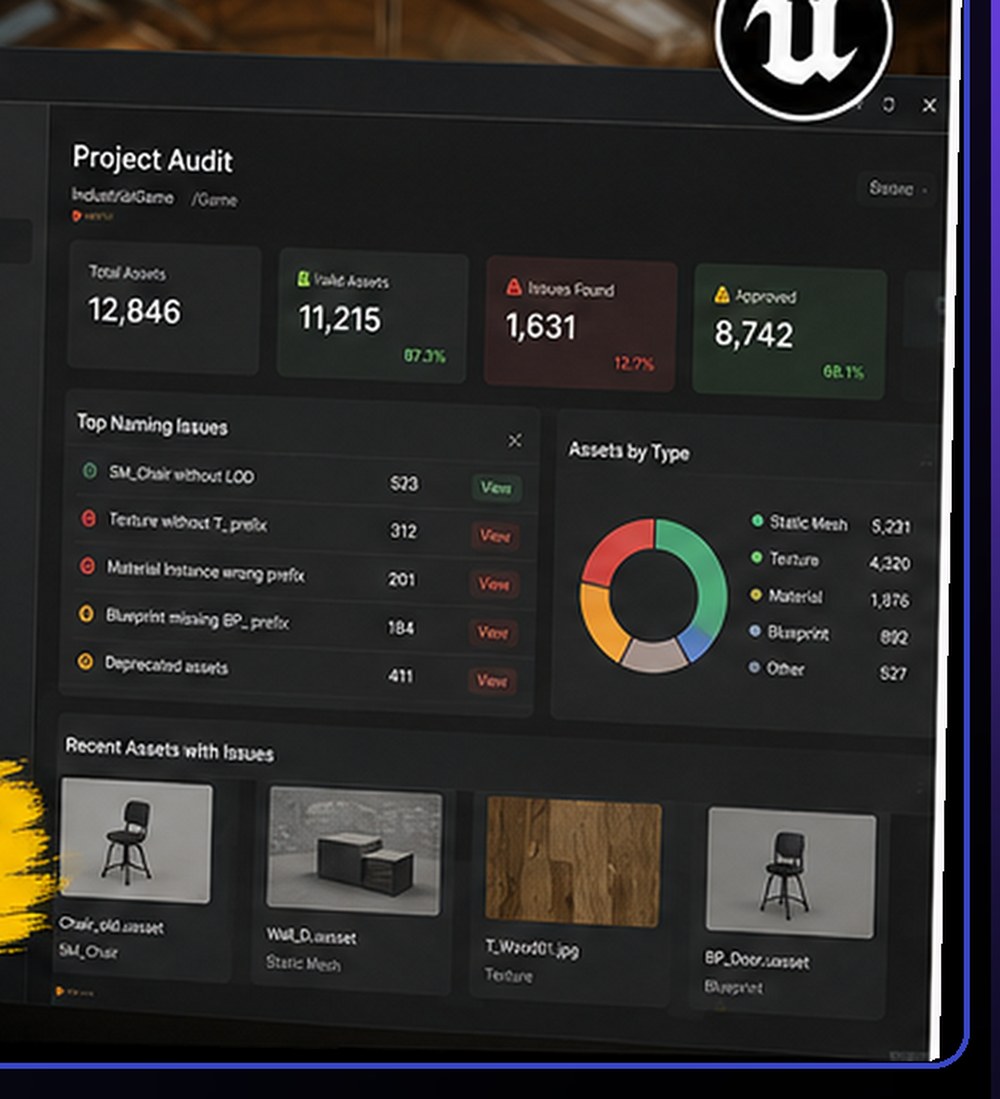
T_ prefix, material instances on the wrong prefix, and 411 deprecated assets still sitting in the project.Enter Unreal Studio Hub
Unreal Studio Hub is designed to give development teams an external view of what is happening inside an Unreal project.
BizziGroup’s current version can scan UE5 projects, validate naming across more than 50 asset types, run project audits, track approval states and export reports.
The interesting part isn’t any single feature. It’s the idea of treating project hygiene as something that can be checked systematically rather than relying entirely on artists remembering a studio guideline.
A Practical Example
Consider an environment team delivering a new industrial level. The folder contains:
- 320 static meshes
- 180 materials and material instances
- 640 textures
- Niagara effects
- Blueprints
- Decals
- Temporary blockout objects
- Collision meshes
The art lead wants to know: are all assets using the right prefix? Are temporary assets still present? Are naming conventions consistent? Which assets are approved? What still requires review?
Without a production tool, this often becomes a combination of manual Content Browser searches, spreadsheets, messages and memory. An automated audit gives the team somewhere to start. Instead of checking everything individually, they can focus attention on the assets that actually need attention.
Approval Status Is a Different Problem From File Naming
A well-named asset isn’t necessarily finished. Production teams also need to distinguish between work in progress, ready for review, changes requested, approved and deprecated.
That’s especially important when several people are working in the same project. If an environment artist sees three versions of a prop, the filename alone may not tell them which one is actually approved for use. Unreal Studio Hub’s approval workflow is intended to bring that production information into the asset-management process.
Why This Matters for Indie Studios
Pipeline management is often associated with AAA studios. But smaller studios can be more vulnerable to organisational problems because they don’t necessarily have dedicated pipeline engineers, technical artists and production coordinators.
On a five-person team, everyone is already doing several jobs. The lead artist may also be creating assets. The programmer may also be doing builds. The director may also be handling production.
That makes lightweight automation particularly useful. The aim isn’t to create more administration. It’s to reduce the amount of project administration people need to do manually.
The Best Time to Organise a Project Is Before It Needs Organising
A common mistake is waiting until a project becomes difficult to navigate before introducing standards. By then, cleaning it up can involve hundreds or thousands of existing assets.
Studios beginning a new Unreal project should ideally define at least:
- Naming conventions
- Folder structure
- Version rules
- Asset ownership
- Approval states
- Temporary asset rules
- Delivery requirements
Those standards don’t have to be complicated. They just need to be clear enough that different people make similar decisions.
Project Auditing Could Become a Normal Part of Development
Game development already contains regular validation processes. Programmers run tests. Build systems check whether software compiles. QA teams look for gameplay defects. Source control tracks code and content changes.
Asset auditing is a natural extension of that thinking. Instead of waiting for a producer or technical artist to discover a disorganised section of the project, teams can periodically inspect project structure and correct smaller problems before they spread.
A weekly asset audit may not sound exciting. Neither does fixing thousands of badly named files three weeks before launch.
Unreal Studio Hub’s Role
Unreal Studio Hub isn’t trying to replace Unreal Engine. It sits alongside it. Unreal remains where developers build the game. The Hub is intended to help answer a different question: is the project itself being maintained cleanly as it grows?
For studios managing increasingly large Unreal projects, that distinction could be useful.
Unreal Studio Hub is one of BizziGroup’s browser-based production tools for creative and game-development teams.
Frequently Asked Questions
What is Unreal Engine asset management?
Asset management is the process of organising, naming, reviewing and tracking the content used in an Unreal Engine project, including meshes, textures, materials, Blueprints, animation, audio and VFX.
Why are Unreal naming conventions important?
Consistent names make assets easier to search, identify and understand. They are particularly useful when several developers are working inside the same project.
Is this only useful for large studios?
No. Smaller studios can benefit because they may not have dedicated pipeline staff to manually check project organisation.
Does Unreal Studio Hub replace Unreal Engine’s Content Browser?
No. The Hub is designed as a production and auditing layer around an Unreal Engine project rather than a replacement for Unreal itself.
More BizziGroup Production Tools
- Fixing a Bad Shot Is Cheap on a Storyboard — Expensive in Production
- Houdini Artists Keep Searching for the Same VEX Code — This Free Toolkit Puts 70+ Snippets in One Place
- From Browser to Substance 3D Painter: A Different Approach to Building PBR Materials
- Your Nuke Script Works on Your Machine. Will It Work on Someone Else’s?
- Meet Bizzibee Arcade: Free Browser Games You Can Play Instantly
- Your Unity Assets Folder Shouldn’t Require Archaeology
- Can You Prove You’re Allowed to Ship Every Asset in Your Game?