Imagine discovering halfway through an animated sequence that the camera angle doesn’t work. The character has already been modelled. The environment has been built. Animation has started. Lighting is underway.
Now compare that with discovering the same problem as a rough sketch on a storyboard. One version costs seconds to change. The other may affect several departments.
That difference is why storyboarding remains one of the most useful forms of pre-production in film, animation and game development.
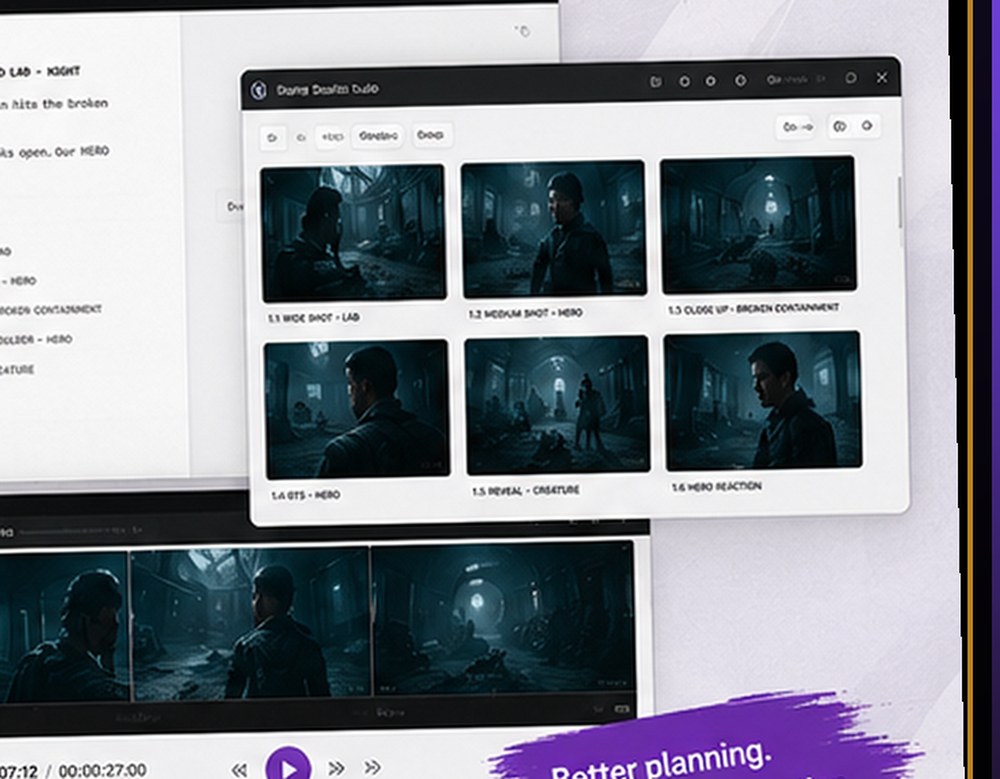
BizziGroup’s Storyboard Studio is built around a straightforward idea: make that planning process accessible from the browser and keep the workflow moving from script through storyboard and into animatic.
Storyboards Aren’t Really About Drawing
Great drawing skills can certainly help create beautiful boards. But that’s not the primary purpose of storyboarding. A storyboard is really a tool for answering questions.
- Where is the camera?
- Where is the character?
- What does the audience need to see?
- What happens next?
- How does one shot connect to another?
- How long should we remain on this moment?
- Does the action read clearly?
Those questions matter whether you’re creating a live-action film, animated short, commercial, game cinematic or interactive sequence.
The Problem With Planning Across Five Different Tools
Pre-production often becomes fragmented. A script lives in one application. Reference images live in folders. Storyboard frames are stored somewhere else. Timing is tested in an editing application. Notes happen in email or chat.
That can work, particularly on small productions. But as a sequence changes, keeping all of those pieces aligned becomes harder.
Storyboard Studio brings more of that planning into one workflow. The current application allows creators to write or import a script, break it into scenes and shots, create storyboard frames, organise boards, set timing and transitions, incorporate mood and audio information and play the sequence back as an animatic.
Script → Scene → Shot → Board → Animatic
That progression is important. A written scene may sound exciting but still be difficult to stage visually. Breaking it into shots forces the filmmaker or designer to make decisions. For example:
Scene: The player enters an abandoned laboratory and discovers the creature.
That single line might become:
- Shot 01: Wide establishing shot of the laboratory.
- Shot 02: Player enters frame.
- Shot 03: Insert of broken containment unit.
- Shot 04: Close-up reaction.
- Shot 05: Creature movement in background.
- Shot 06: Reveal.
Now the sequence can actually be assessed. Does the reveal happen too quickly? Do we need the close-up? Would the creature be more effective if it appeared in the background before the player notices it?
Those are storyboard decisions. They’re much cheaper to make now than after animation begins.
Why Game Developers Should Care About Storyboarding
Storyboarding is often discussed in the context of film, but game developers have many of the same problems. A game may contain:
- Opening cinematics
- Boss introductions
- Dialogue sequences
- Level transitions
- Tutorials
- Scripted gameplay moments
- Environmental storytelling
- Character interactions
- Ending sequences
Even gameplay itself can benefit from visual planning. A level designer can board the sequence of information presented to a player: what do they see when they enter? What draws their attention? Where is the threat introduced? When is the objective revealed? What happens if the player looks in the opposite direction?
That makes storyboarding useful beyond traditional cutscenes.
The Animatic Is Where Timing Problems Become Obvious
A collection of storyboard frames tells you what happens. An animatic starts to tell you how it feels. Take six perfectly acceptable storyboard panels and assign timing:
Shot 1 — 4 seconds
Shot 2 — 2 seconds
Shot 3 — 1 second
Shot 4 — 3 seconds
Shot 5 — 5 seconds
Shot 6 — 2 seconds
Play them in sequence and suddenly you can feel the pacing. Perhaps Shot 1 drags. Perhaps the reveal in Shot 6 happens too quickly. Perhaps the reaction needs another second.
This is one of the biggest benefits of previsualisation: problems that are difficult to spot on the page become obvious once time is introduced.
Keeping Creative Work Local
Storyboard Studio uses a local-first approach. Scripts, drawings, boards and concept art are stored in the user’s browser rather than being uploaded as project content to BizziGroup’s servers. The application is also designed to work offline.
For creative teams working with unreleased scripts, designs or game content, that approach is notable. It allows browser software to behave more like a local creative application while retaining the accessibility of a web interface.
A Useful Middle Ground
Previsualisation software often falls into two camps. At one end are full professional production packages with deep feature sets. At the other are presentation slides, whiteboards and collections of images assembled manually.
There is room between them for focused tools. Storyboard Studio isn’t trying to become a 3D animation suite, editing package or game engine. Its purpose is narrower: help creators make visual decisions before those decisions become expensive.
What Should You Work Out Before Production?
Before a sequence moves into animation, filming or full implementation, the team should ideally know:
- What each shot needs to communicate
- Where the viewer should look
- How characters move through the frame
- Where important reveals occur
- Approximately how long each shot lasts
- How shots transition
- What audio or dialogue drives the timing
- Whether the sequence is actually understandable
Not every detail needs to be final. The point is to remove the biggest unanswered questions.
Storyboard Studio is one of BizziGroup’s browser-based production tools for creative and game-development teams.
Frequently Asked Questions
What is an animatic?
An animatic is a timed sequence of storyboard images, often accompanied by dialogue, audio or temporary sound. It allows creators to test pacing before final production.
Can storyboards be used for video games?
Yes. They can be used for cinematics, dialogue sequences, tutorials, scripted gameplay, boss introductions and even level-flow planning.
Do you need to be a good artist to storyboard?
No. Clear communication matters more than polished illustration. Simple drawings can still communicate composition, movement and timing.
Is Storyboard Studio browser-based?
Yes. It runs in the browser and is designed around a local-first workflow.
More BizziGroup Production Tools
- Why Large Unreal Engine 5 Projects Become Difficult to Manage
- Houdini Artists Keep Searching for the Same VEX Code — This Free Toolkit Puts 70+ Snippets in One Place
- From Browser to Substance 3D Painter: A Different Approach to Building PBR Materials
- Your Nuke Script Works on Your Machine. Will It Work on Someone Else’s?
- Meet Bizzibee Arcade: Free Browser Games You Can Play Instantly
- Stop Retyping the Edit Into a VFX Spreadsheet
- USD Is Powerful Because Files Reference Other Files