The shot is approved. The comp looks correct. You send the Nuke script to another artist.
A few minutes later, a message arrives. “Where’s the plate?” Then another. “I’m missing the LUT.” Then: “What font did you use?”
The script wasn’t actually broken. It worked perfectly on the machine where it was created. The problem was that part of the project existed outside the script in places nobody had checked before handoff.
BizziGroup’s Nuke Studio Hub is built around preventing exactly this situation.
A .nk File Isn’t Always the Whole Project
A Nuke script can reference many external resources. Obvious dependencies include image sequences loaded through Read nodes. Less obvious dependencies can include:
- LUTs
- CDL files
- Geometry
- Vector fields
- Fonts
- Gizmos
- ToolSets
- Rendered elements
- Output locations
A compositor may not even think about those files while working because they resolve automatically on their workstation. That changes the moment the project moves somewhere else.
The Classic Local-Path Problem
Imagine a Read node points to:
D:/Projects/Commercial/SHOT_020/plates/plate_v003.exrThat path may work perfectly for the compositor. Now send the script to a vendor. Their computer doesn’t have that drive. Even if you include the plate, the script may still point to a location that doesn’t exist.
Production pipelines generally try to use project-relative or otherwise portable paths for exactly this reason. But with enough shots and enough artists, bad paths still slip through.
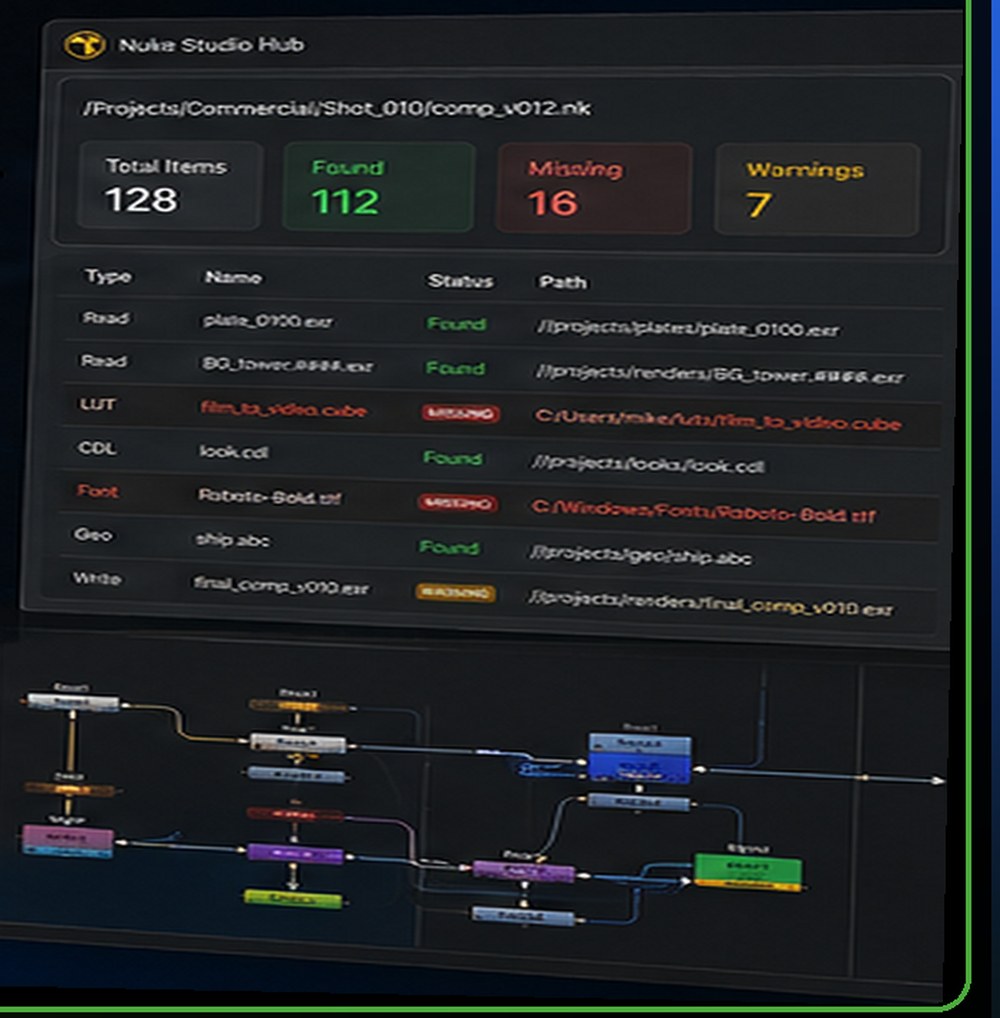
C:/Users/mike/luts/ and C:/Windows/Fonts/. That is precisely the class of dependency that works locally and fails on handoff.Preflight Before Handoff
The idea behind a preflight check is simple: inspect the project before somebody else has to discover the problems.
Nuke Studio Hub parses .nk scripts and can inspect areas such as Read media, Write paths, naming and version tokens. Its dependency tools can also build a manifest of external resources referenced by the comp, including media, LUTs, CDLs, vector fields, fonts and geometry.
That changes the handoff question from “Did I remember everything?” to “What does the script say it actually needs?”
What a Dependency Manifest Can Tell You
Imagine a comp contains 12 image sequences, 3 rendered CG elements, 2 .cube LUTs, 1 CDL, 1 piece of geometry, 2 fonts and 1 vector field.
The compositor may remember the plates and renders. The LUT stored in a personal tools directory is easier to miss.
A dependency manifest gives the team a clearer list of what the comp relies on and whether those paths resolve. It can also help identify whether a path is portable or tied to a specific local environment. That’s valuable before sending a project to another compositor, a render farm, a remote worker, a client, an external vendor or an archive.
Why Missing Dependencies Are Expensive
A missing file may take only a minute to fix. The interruption can cost much more.
The recipient stops working. They contact the sender. The sender reopens the project. Someone locates the file. Another transfer begins. The recipient reconnects the path. Then they try again.
Repeat that across multiple shots and multiple artists and seemingly minor pipeline issues become a real production cost. Good preflight doesn’t make the creative work better. It helps prevent technical administration from interrupting the creative work.
Write Nodes Deserve Attention Too
Input dependencies aren’t the only source of problems. Output paths matter. A Write node pointing to the wrong folder can cause renders to disappear into unexpected locations or fail on another machine.
Version tokens also matter. If the script is v012 but the render path still points at v010, the resulting output can become confusing very quickly.
Naming conventions and version alignment may sound mundane, but they’re exactly the kind of details that become important during fast-moving production.
Handoff Problems Aren’t Limited to Large VFX Studios
A large facility may already have pipeline systems checking many of these things. Freelancers and small teams are often more exposed.
A freelancer might move a Nuke project between a home workstation, a studio workstation, a laptop, a client network, cloud storage and external drives. A five-person post studio may work with several external artists without having a full-time pipeline developer.
For these teams, lightweight validation can provide some of the discipline of a larger pipeline without requiring one to be built from scratch.
An Example Preflight
Before delivering a comp, an artist could check:
- Media — do all Read nodes resolve? Are frame sequences complete? Are references portable?
- Colour — are external LUTs and CDLs included?
- Other dependencies — are fonts, geometry and vector fields accounted for?
- Output — do Write paths point to the expected project location?
- Naming — do node and output names follow production conventions?
- Versions — do script versions and output versions make sense?
- Package — can another machine access everything the project needs?
None of these checks are particularly glamorous. That’s exactly why automation helps.
“Works on My Machine” Is Not a Delivery Standard
There is an important distinction between a project being functional and a project being portable. A compositor may have a perfectly functional Nuke setup. If that setup depends on local files that nobody else has, the project isn’t ready to move.
A good handoff means the recipient should be able to understand what is required without reverse-engineering the sender’s workstation. That’s the underlying problem Nuke Studio Hub is designed to address.
Where Browser-Based Pipeline Tools Fit
Nuke Studio Hub doesn’t replace Nuke. It doesn’t need to. Nuke is where compositors build shots. The Hub sits around the production process and asks questions such as: are the paths correct? What does this script depend on? Is media missing? Are versions consistent? Can the project be handed to somebody else cleanly?
That is a good use case for focused browser software because the goal is validation rather than replacing the creative application.
Nuke Studio Hub is one of BizziGroup’s browser-based production tools for creative and game-development teams.
Frequently Asked Questions
What is a Nuke dependency?
A dependency is an external file a Nuke script relies on, such as image media, a LUT, CDL, font, geometry file or vector field.
Why does a Nuke script work on one computer but not another?
A common cause is that the script references local paths or dependencies that aren’t available on the second machine.
What is a Nuke preflight check?
Preflight means checking the technical readiness of a script before render, handoff or delivery. This may include dependencies, paths, naming and version information.
Can freelancers benefit from pipeline validation?
Yes. Freelancers often move projects between machines and clients, making portability checks particularly valuable.
More BizziGroup Production Tools
- Why Large Unreal Engine 5 Projects Become Difficult to Manage
- Fixing a Bad Shot Is Cheap on a Storyboard — Expensive in Production
- Houdini Artists Keep Searching for the Same VEX Code — This Free Toolkit Puts 70+ Snippets in One Place
- From Browser to Substance 3D Painter: A Different Approach to Building PBR Materials
- Meet Bizzibee Arcade: Free Browser Games You Can Play Instantly
- Stop Retyping the Edit Into a VFX Spreadsheet
- The Worst Time to Find a Delivery Error Is After a 100GB Upload
- Catch Colour-Management Problems Before They Become Render Problems