Most Houdini artists know the experience. You know exactly what you want to do. Randomise pscale. Find nearby points. Remap a value. Generate a mask. Rotate points around an axis. Read an attribute. Create a group.
You may even have written the code before. You just can’t remember the exact VEX syntax. Five minutes later you’re searching documentation, old project files, forum posts or messages trying to recover three lines of code.
BizziGroup’s Houdini VEX Lab is designed for that moment. The free browser toolkit brings together more than 70 copy-and-paste VEX snippets along with Houdini expressions, HScript reference material, global variables and a $JOB project-structure generator.
Why VEX Is So Useful
Houdini’s node-based workflow allows artists to achieve a huge amount without writing code. VEX becomes valuable when you want more direct control. A small Attribute Wrangle can manipulate thousands or millions of points procedurally.
For example, randomising the scale of scattered objects might only require a few lines:
float randomValue = rand(@ptnum);
@pscale = fit01(randomValue, 0.5, 1.5);
The important idea isn’t memorising those two lines. It’s understanding that each point can generate a deterministic random value and that value can drive an attribute. Once an artist understands the pattern, it can be adapted to colour, rotation, scale, density or countless other controls.
VEX Is Often Easier to Learn From Working Examples
Programming documentation is useful when you already know what you’re looking for. It can be less approachable when you’re learning.
A working snippet gives an artist a starting point. You can paste the code into a wrangle. Change one value. See what happens. Change another. Break it. Fix it.
That feedback loop is often much more effective than attempting to memorise a long list of functions. A snippet library therefore serves two different purposes. For experienced artists, it’s a reference. For new Houdini users, it’s a learning tool.
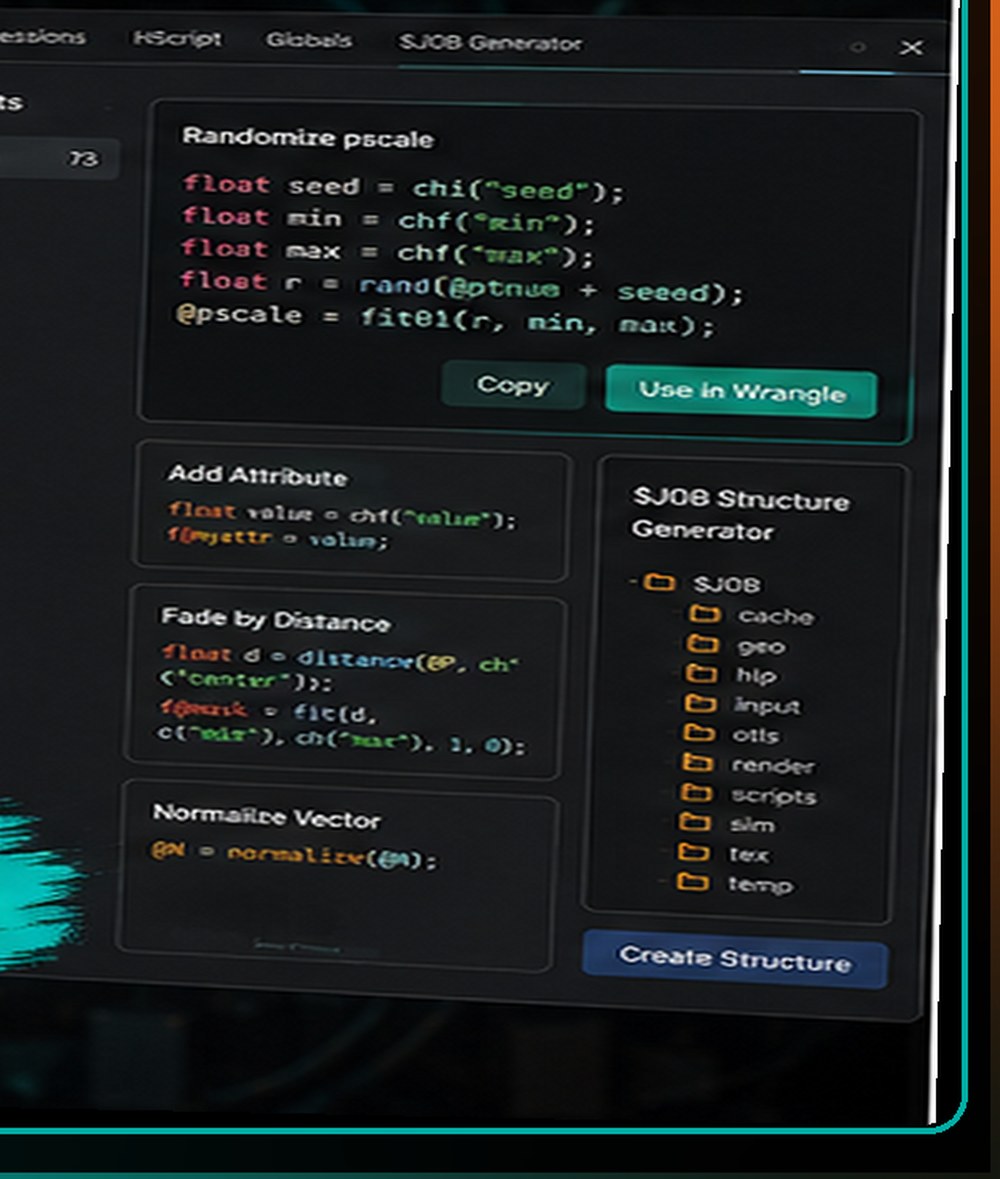
$JOB structure generator laying out cache, geo, render and tex folders for a portable project.You Don’t Need to Become a Software Engineer
One of the barriers to VEX is psychological. Artists see code and assume they need a computer-science background before they can use it. That’s not true. An artist who learns only a small collection of VEX concepts can already do a great deal:
- Read and write attributes
- Generate random values
- Work with vectors
- Remap ranges
- Test conditions
- Create groups
- Manipulate positions
- Query nearby geometry
- Drive procedural masks
- Build reusable controls
You don’t need to begin by writing a complex solver. Start with one practical problem.
The “Useful Snippet” Approach
Imagine you want each copied rock in a procedural environment to have a slightly different size. You find a snippet. You modify the minimum and maximum scale. It works.
Next week you need random rotation. The concept is already familiar. Then perhaps you combine the two. Later you add a condition based on height. Eventually, the code stops looking like mysterious syntax and starts looking like another Houdini tool.
That’s where a well-organised snippet library can be useful.
Houdini VEX Lab Goes Beyond VEX
The VEX library is the headline feature, but the toolkit also includes reference material for other parts of Houdini that artists regularly need to look up. That includes:
- Expression references
- HScript cheatsheets
- Houdini global variables
- A
$JOBproject-structure generator
The $JOB tool is particularly useful because project organisation is another area that becomes more important as Houdini work moves from experimentation into production.
What Is $JOB?
In Houdini, $JOB can point to the root of a project. Instead of saving a texture path like C:/Users/Artist/Desktop/Project/texture.png, a production project might reference $JOB/tex/texture.png.
A typical project might contain folders such as:
$JOB/hip/
$JOB/geo/
$JOB/sim/
$JOB/render/
$JOB/tex/
$JOB/comp/
$JOB/otls/
That makes it easier to move the project between machines and artists without rebuilding file paths every time. The VEX Lab’s $JOB generator gives artists a quick way to establish a cleaner structure from the beginning.
That’s More Important Than It Sounds
Many Houdini artists begin by working alone. Files go wherever they’re convenient. Caches go onto the desktop. Textures live in Downloads. An HDA is stored somewhere in Documents.
Then the project needs to be transferred. Suddenly all those local paths matter.
Good pipeline habits don’t need to be complicated, but they’re much easier to establish before a project grows. That’s why it makes sense to place code references and project-structure tools alongside each other. Both are ultimately about helping artists work faster without creating unnecessary problems later.
A Useful Entry Point Into Houdini
Houdini has a reputation for being difficult to learn. Part of that difficulty comes from the number of different concepts artists encounter at once: SOPs, attributes, VEX, expressions, environment variables, HDAs, caching, simulation and procedural workflows.
No single reference can teach all of Houdini. But removing friction from the “I know what I want to do, I just can’t remember the syntax” stage can make learning more enjoyable.
Why Making It Free Matters
A free reference tool has a different role from a paid production application. There is very little friction. An artist can simply open it when needed.
That makes Houdini VEX Lab a useful discovery tool for BizziGroup as well as a practical resource for the Houdini community. Artists who need deeper project validation, HDA tracking and Houdini-to-engine handoff can then move into BizziGroup’s broader Houdini production tools if and when those problems become relevant.
Houdini VEX Lab is one of BizziGroup’s browser-based production tools for creative and game-development teams.
Frequently Asked Questions
What is VEX in Houdini?
VEX is Houdini’s high-performance expression language. Artists commonly use it inside wrangle nodes to manipulate attributes and geometry procedurally.
Do I need to know programming to use VEX?
No. Basic programming concepts help, but artists can start with very small snippets and gradually build their understanding.
What is $JOB in Houdini?
$JOB is an environment variable commonly used to point to a project’s root directory, helping keep caches, textures, renders and scene files portable.
Is Houdini VEX Lab free?
Yes. BizziGroup currently offers Houdini VEX Lab as a free browser toolkit.
More BizziGroup Production Tools
- Why Large Unreal Engine 5 Projects Become Difficult to Manage
- Fixing a Bad Shot Is Cheap on a Storyboard — Expensive in Production
- From Browser to Substance 3D Painter: A Different Approach to Building PBR Materials
- Your Nuke Script Works on Your Machine. Will It Work on Someone Else’s?
- Meet Bizzibee Arcade: Free Browser Games You Can Play Instantly
- A Houdini Project Can Be Procedurally Brilliant and Operationally Chaotic